You've got recipes in too many places to trust your memory. Some are clipped to paper, some live in screenshots, some are buried in bookmarks, and a few are only sitting in your head.
The fix is a hybrid recipe system: gather everything, digitize what's physical, organize it into a small structure, then curate it so the collection stays usable. If you keep the taxonomy tight and connect it to meal planning, recipe organization stops being an archive project and becomes a working kitchen system.
What's the fastest way to gather and digitize every recipe you own?
The fastest method is the four-step pipeline: gather, digitize, organize, curate. That sequence matters because the common mistake is sorting half your collection before you've seen all of it, which almost always creates duplicates and dead ends. A complete capture pass gives you one staging area, then you can make better decisions about what deserves to stay.
Start by emptying every source into one temporary holding zone. Paper clippings, handwritten cards, browser bookmarks, screenshots, saved PDFs, and loose printouts all belong in the same pile first. The point isn't to make it pretty, it's to stop losing recipes in scattered places.

Capture the physical pieces first
Handwritten cards and magazine clippings are the easiest to lose, so scan those early. A phone scanner app is enough for most home cooks, because the goal is readable text and a stable digital copy, not museum-quality archiving. Put each scan into a single intake folder before you sort anything.
Practical rule: if a recipe exists on paper, it doesn't count as organized until there's a digital copy you can search.
If you use browser bookmarks, export them into a single file or folder instead of leaving them scattered across tabs and devices. Screenshots should also be moved into one place immediately, because screenshot collections age badly once your camera roll fills up. The same is true for PDFs, which tend to get duplicated when they're saved from multiple sources.
Use a simple first-pass filter
A low-friction way to reduce the pile is the two-bucket method, dessert and not dessert. That sounds almost absurdly simple, but it works because it forces every recipe into one of two mutually exclusive groups before you overthink categories. The source material from a practitioner video recommends collecting first, then sorting, then sorting again from there.
Once the stack is manageable, you can decide what to keep, what to digitize, and what to discard. If a recipe has never been cooked, has no clear ingredients, or isn't something you'd realistically make again, it probably doesn't need to survive the curation pass.
For a recipe library that will eventually feed weekly cooking, keep the newly gathered set moving into a real system rather than letting it sit in a “to sort” folder. If you want a practical starting point for turning that raw pile into usable recipe data, this recipe hub is a useful place to begin.
How do you build a filing system for physical and digital recipes?
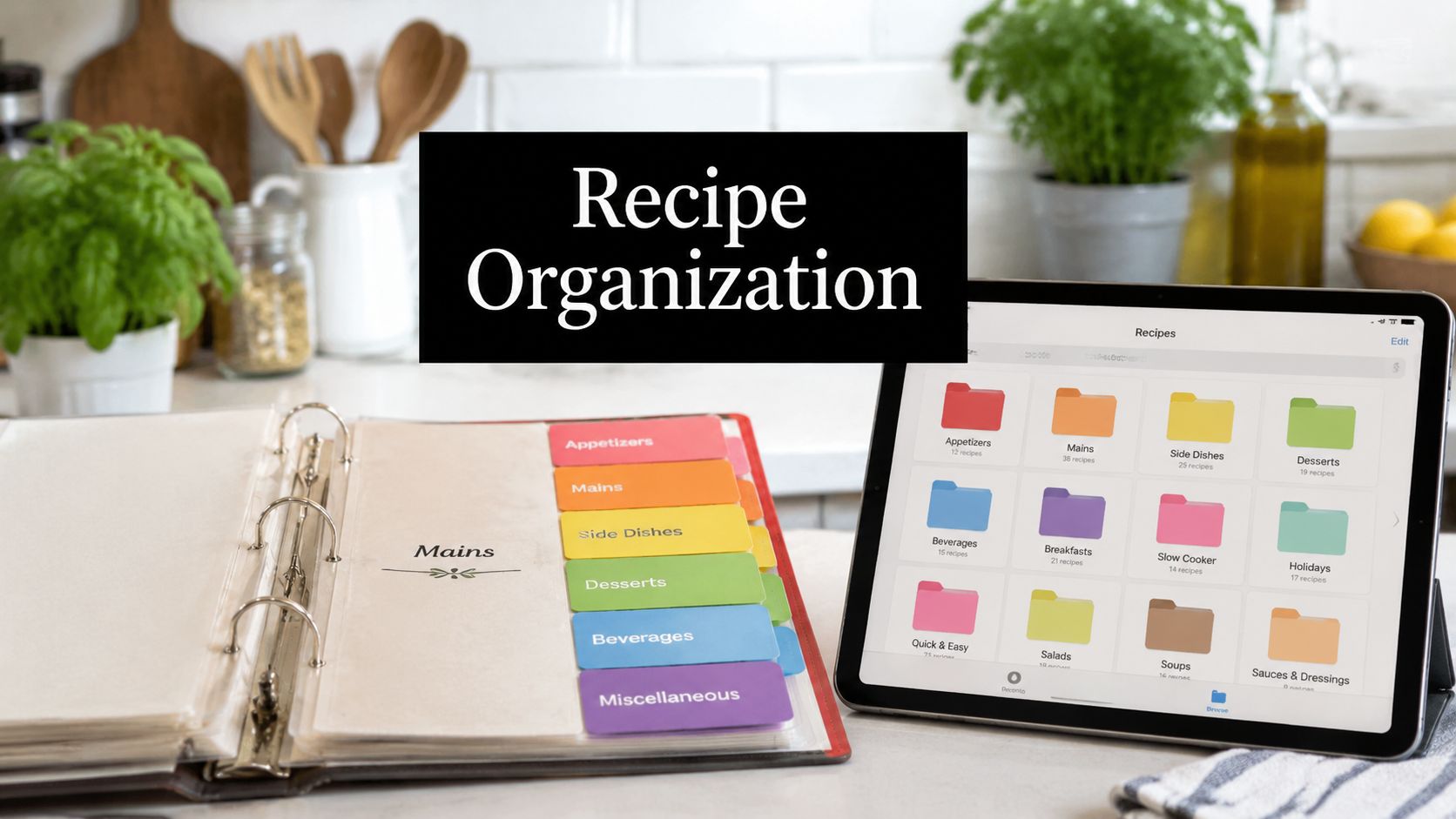
Use one structure in two formats. A physical binder and a digital folder tree should mirror the same categories, because the goal is not two separate systems, it's one search logic that works whether a recipe is clipped, scanned, or saved as a link.
The physical version still works well because a three-ring binder with clear page protectors and tab dividers lets you add, remove, and reorder pages without rewriting the collection. Adobe's guide recommends starting broad with sections like Breakfast, Appetizers, Main Courses, Desserts, and Beverages, then subdividing those sections when needed. A master index or table of contents at the front matters because it lets you find recipes by category instead of memory alone.

Keep physical storage easy to maintain
The binder only works if page protectors stay consistent. Put one recipe per sleeve when you can, or group related pages together if the recipe is short. Use the tabs for broad sections only, not tiny subfolders, because physical systems get frustrating when you have to flip through too many layers.
A master index should sit at the front and list recipes under the category you'd search for when you're cooking in a hurry. That index is the difference between a binder that feels clever and one that feels usable.
Make digital files searchable, not cute
For digital recipes, create one primary home folder and keep the naming convention boring and consistent. A filename like Chicken Tortilla Soup, family favorite, PDF is much more useful than a vague title saved from a browser. Standardized names make search work, especially when you have multiple copies from different devices.
Use status labels that match how you cook, such as untested, tested, or family favorite. That kind of labeling keeps you from mistaking a saved recipe for a trusted one. A quick cleanup review also matters, because digital collections drift when duplicate links and old screenshots pile up.
If your downloads folder is already a mess, a practical guide on how to tame your downloads folder can help you clean the intake side before recipe files spread further.
Decide where new recipes land first
The biggest hybrid-system mistake is letting new recipes wander. A saved link, screenshot, or PDF needs one capture point first, then one later destination after review. That keeps you from duplicating the same recipe across folders, albums, and note apps.
If you want a companion toolset for this kind of structured setup, these recipe tools fit naturally alongside a lean filing system.
Which categories and tags actually match the way you cook?
The best taxonomy is usually the smallest one you can live with. Expert guides consistently point toward 5 to 10 core categories, or even 5 to 7 broad categories, because broad buckets are easier to maintain than deep folder trees with overlapping labels. A system that looks elegant on paper usually fails once the pile grows and you're tired on a weeknight.
Start broad, then test it on a tiny sample
A good set of starter categories might include breakfast, mains, desserts, dietary needs, and cooking method. That's enough structure to find things without forcing every recipe into a unique corner. One practitioner guide suggests testing the system with just 10 to 15 recipes first, which is a smart way to see whether the labels match real cooking habits before you commit.
Practical rule: if a category name doesn't sound like something you'd search while hungry, rename it.
Modern recipe organization has clearly moved beyond the old paper-binder mindset. Digital libraries are built for quick retrieval, not just storage, so the actual job is making sure the category names reflect how you look for dinner at 5:30 p.m., not how a filing system would look in a spreadsheet.
Use tags for the details, folders for the big buckets
Tags should carry the finer information, like vegetarian, gluten-free, weeknight, or prep-ahead, while folders stay broad. That keeps you from duplicating the same recipe across half a dozen folders just to capture nuance. In practice, folders answer “where does this live?” and tags answer “what kind of meal is it?”
The same logic works if you like to sort by household use case instead of cuisine. A recipe for chili can live in mains, carry the tag weeknight, and still be easy to find when you need budget-friendly dinner ideas. If you want to see more recipe groupings built around real cooking behavior, these food categories are a useful reference point.

Match your taxonomy to your actual search habits
The whole point of this structure is speed. If you normally think “something fast for Tuesday” rather than “Italian poultry,” then your system should include meal type and prep time as searchable tags. If you think in terms of occasions, use that too, but keep the list short enough that you can maintain it without second-guessing every save.
A clean category set also makes it easier to prune clutter later. When a recipe doesn't fit anywhere cleanly, that's often a sign the recipe isn't useful enough to keep, not a reason to invent another folder.
How do you connect recipes to meal plans and grocery lists?
Organized recipes become valuable when they move into your weekly cooking routine. A tidy archive is nice, but the real payoff comes when your recipes can be grouped into weeknight dinners, budget meals, healthy lunches, and quick breakfasts that fit your schedule. That shift turns recipe organization into a planning tool instead of a storage habit.
The easiest way to start is small. Pick 5 to 10 favorite recipes, tag them by meal type and prep time, then build a one-week plan from that starter set. That keeps the process manageable and gives you a working loop before you expand the library.
Build the weekly plan from the recipes you already trust
Start with recipes you'd already make without hesitation. That lowers decision fatigue and makes the grocery list more reliable because you're not building around experiments. If you want inexpensive meal inspiration to seed that starter set, cheap easy recipe ideas can help you fill the gaps without overcomplicating the plan.
Once the recipes are chosen, group them by day or by use case. I've found that the more the menu reflects real household rhythms, the less likely it is to collapse midweek. Leftover reuse matters here too, because if Monday's dinner shares ingredients with Wednesday's lunch, grocery shopping gets simpler and food waste usually drops.
Turn the plan into a shopping list that shops like you do
A grocery list works best when it's sorted the way a store is laid out, not the way a recipe is written. That means vegetables together, pantry items together, dairy together, and so on. AI Meal Planner can generate weekly plans from your preferences and create a grocery list that's sorted by aisle, which fits neatly into this workflow. You can also use the grocery list generator if you want the shopping side handled automatically.

A one-week plan built from a small, tagged recipe set is more realistic than a huge menu built from a messy archive. That's the bridge between “I saved this recipe somewhere” and “I know what we're eating this week.”
How do you keep the system usable after the first cleanup?
A recipe system fails when it becomes a graveyard of duplicates, untested saves, and half-finished folders. The fix is boring but effective, standardize new captures immediately, then review the collection on a schedule so nothing piles up in limbo. Search stays reliable only when the library stays clean.
Use a short maintenance routine
Every new recipe should go through the same intake path. If it arrives as a screenshot, rename it. If it arrives as a link, move it into the primary home folder. If it's a paper clipping, scan it before it disappears back into a drawer.
Periodic cleanup should focus on three things, duplicates, recipes you've never cooked, and recipes that no longer fit how your household eats. That's where the system gets sharper over time instead of just larger. I've found that once a collection starts reflecting actual cooking habits, it gets easier to trust again.
Start today with a small, realistic batch
Don't try to organize your entire archive in one afternoon. Gather your first batch, digitize the physical pieces, sort them into a small category set, and choose a few recipes to cook this week. That sequence builds confidence fast because you see immediate usefulness, not just neat folders.
A system is finished when it helps you decide what to cook without digging through everything twice.
If you want a faster path from preferences to usable weekly menus, AI Meal Planner can take your goals, dietary needs, and favorite recipes and turn them into a structured starting point. It's especially useful when you want the recipe collection to drive meals and shopping instead of sitting in a separate archive.
If you're ready to turn scattered recipes into a system you'll use, AI Meal Planner can help you build weekly menus and grocery lists from your preferences and saved recipes. Start with the onboarding flow, then let your recipe collection become something you cook from every week instead of something you just store.
AI-powered nutrition
Get Your Personalized Meal Plan
AI creates the perfect meals for your goals, lifestyle, and taste.
Start Your Journej